


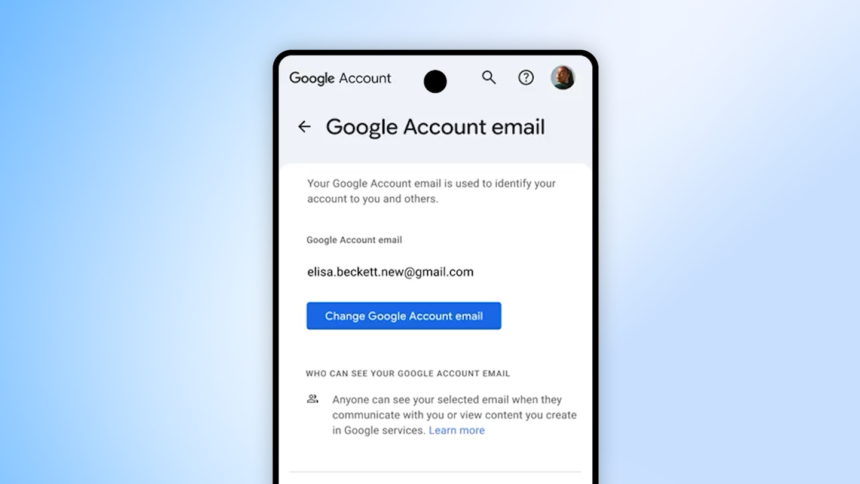
Google has rolled out a major update that allows users to change their Gmail username—the part before “@gmail.com”—directly within an existing Google Account, without losing emails, Drive data, or any linked services. For the first time ever, Gmail users in the United States can pick a new @gmail.com address while keeping their old one as an alias, a feature that many people have waited over two decades for.
What the new username change feature does
The update lets you modify your Gmail handle while preserving all content and settings tied to your account, including mail, Drive, Photos, Calendar, and more. Your previous username is not deleted; instead, Google converts it into an alternate email, so you can still sign in with the old address and receive messages sent to it.
This also means that relatives, colleagues, and subscription services can still contact you on the old address, while your new username becomes your primary public identity.
Limits and rules for changing your username
To prevent abuse and keep account identities stable, Google has set clear limits on how often you can change your Gmail username.
- You can change your username once per year, up to a total of three times in your account’s lifetime.
- The new username must be an available @gmail.com address that isn’t already taken or recently deleted.
- The change must be confirmed in your Google Account settings, often with an email or verification step.
Step‑by‑step: How to change your Gmail username
For eligible users (currently all Google Accounts in the United States), the process is simple and browser‑friendly.
- Go to myaccount.google.com and sign in to your Gmail account.
- Under Personal info, open the Email section (or the Username/Email field).
- If you’re eligible, you’ll see an option like Change email or Change username; tap or click it.
- Enter your preferred new @gmail.com username and ensure it’s available.
- Complete the on‑screen prompts (confirmation email, verification, etc.) and confirm the change.
After this, you can log in with either the new or the old username, and all incoming mail will arrive in the same inbox.
Why this update matters for users
For many people, Gmail addresses were created during school days or early internet use and now feel unprofessional, outdated, or even embarrassing. Until now, the only way to “fix” that was to create a whole new account and manually move data, which was time‑consuming and risky.
With this feature, users can:
- Update their email to something more professional or personal.
- Avoid managing multiple accounts just to keep access to an old address.
- Modernize their digital identity without losing years of emails, contacts, or cloud files.
Availability and when it may come to India
Right now, the username‑change option is fully live for Google Accounts based in the United States, and the toggle appears in the account settings for eligible users. Google has not announced a fixed date for India or other regions but has indicated that it plans a phased global rollout over time.
Until the feature reaches your region, the Change email / Change username option may not appear on your myaccount.google.com page, even if you’re using the latest Gmail app or website. Users in India should keep an eye on the official Google Account Help Center and Google’s blog for updates on when the username‑change feature becomes available locally.